

Photoshoot
Photoshoot turns 1–3 everyday photos into polished AI professional headshots and portraits for LinkedIn, resumes, and personal branding. Natural skin, studio-quality light, and a high-resolution finish—fast and privacy-friendly.
Sign in to rate this tool.
Overview
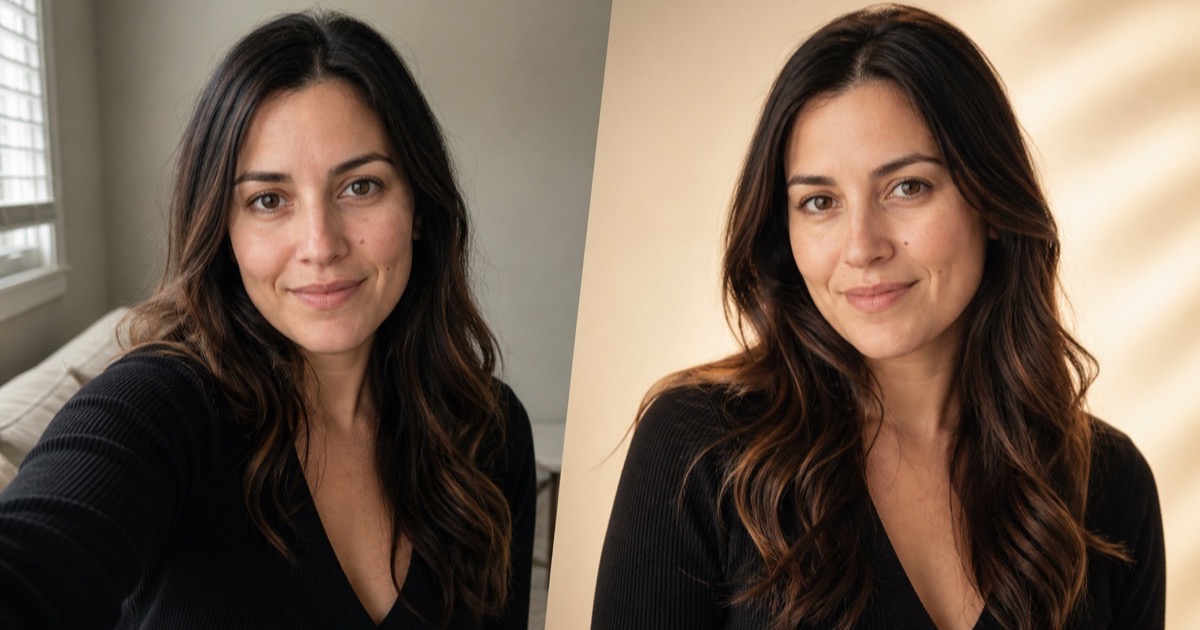
Photoshoot (photoshoot.help) is an AI portrait generator that turns ordinary photos of you into polished, studio-style portraits. You pick a style and up to four scenes, upload one to three everyday photos of the same person, and receive four finished high-resolution portraits per session. The emphasis is on natural results that keep your face recognisably yours rather than heavily stylised avatars.
How it works
- Choose your look: select one portrait style, then up to four real scenes that control the setting, light, outfit direction and pose.
- Add 1–3 clear photos: everyday shots of the same person with the face clearly visible. Each style says how many photos it needs and whether a front or three-quarter view works best.
- Receive four portraits: download them watermark-free.
The site gives guidance for every photo and states that your photos aren't shown publicly.
Styles
There are 12 styles, split into classic and occasion looks:
- Warm editorial: soft daylight and knitwear.
- Studio professional: a clean headshot for profiles, websites and team pages.
- Cinematic night: city lights and a turned pose.
- Clean social avatar: friendly, with room for a square crop.
- Golden-hour outdoor, classic black and white with Rembrandt lighting, and vintage film with 1990s grain.
- Old-money classic, graduation in cap and gown, birthday studio, a friendly Halloween porch and elegant Christmas.
A style gallery lets you open each look and start with it already selected.
Pricing
Photoshoot sells one-time portrait packages, and monthly options are also available. From the pricing page, checked October 2026, the one-time packages are:
- Starter: $8.99 for 30 portraits (about $0.30 each).
- Popular: $19.99 for 90 portraits (about $0.22 each).
- Pro: $39.99 for 240 portraits (about $0.17 each).
All packages include every style and scene, high-resolution watermark-free downloads, and a portrait balance that never expires. Check the site for monthly plan prices and any free trial.
Who it suits
Job seekers updating a LinkedIn or résumé photo, small-business owners who need team or website headshots, and people who want seasonal or occasion portraits, like graduation or holiday photos, without booking a photographer.
Pros: natural-looking styles focused on likeness; clear per-style photo guidance; one-time packages that don't expire.
Cons: one style per session; results depend on the quality of your source photos; AI portraits may not be accepted where an unedited photo is required, such as ID documents.
Details
- Pricing
- Freemium
- Last checked
- 14h ago
- Indexing
- index, follow
- Category
- Photography
Suggest an edit
Sign in to suggest an edit.
Alternatives
 OptivizioAI photo generator for professional-quality visuals.
 AI Christmas PhotoTransforms selfies into AI-generated Christmas photos quickly and affordably.
 ClaidClaid is an AI product photography suite for scenes, fashion models, video and enhancement, with a strong API and Free, Essentials, Pro and Business plans.
 LensaLensa by Prisma Labs is a mobile photo editor with one-tap trend effects, beauty tools, an AI eraser and enhancer, hair try-on and presets.
 AI Photo EditorIf ai image generation tasks take up too much of your day, AI Photo Editor is built to give you time back. It handles the heavy lifting while leaving you...
 AI Ease AI Photo EditorSmall operations appreciate the low setup cost, and larger teams value the consistency. Both end up spending less time on busywork and more on the actual result. It also plays...
 PebblelyPebblely turns plain product photos into styled scenes with 100+ templates and custom prompts, on Lite, Basic and Pro monthly image plans.
 Stable VideoAI video model transforming images/text into videos.
 PhotoroomPhotoroom is an AI product photo editor with background removal, AI scenes, fashion models, video ads, batch editing and an API, on Pro, Max and Ultra plans.
 AI Profile Picture MakerThe feature set covers the basics well and adds thoughtful extras - keyboard shortcuts, reusable templates, and clean sharing options - without overwhelming you. Built for ai image generation work,...
 AI ShotsFor anyone who lives in the ai image generation space, AI Shots is a refreshing find. The setup is light, the results are solid, and nothing is hidden behind menus....
 RollAI-powered platform for studio-quality remote video production using just a phone.
Pros and cons
Pros
- natural-looking styles focused on likeness
- clear per-style photo guidance
- one-time packages that don't expire
Cons
- one style per session
- results depend on the quality of your source photos
- AI portraits may not be accepted where an unedited photo is required, such as ID documents
Checked 2026-10-22.