


Synthesia
Synthesia review (October 2026): AI avatar video platform for training and business video, verified Basic, Starter, Pro and Enterprise pricing.
Sign in to rate this tool.
Overview
What it is
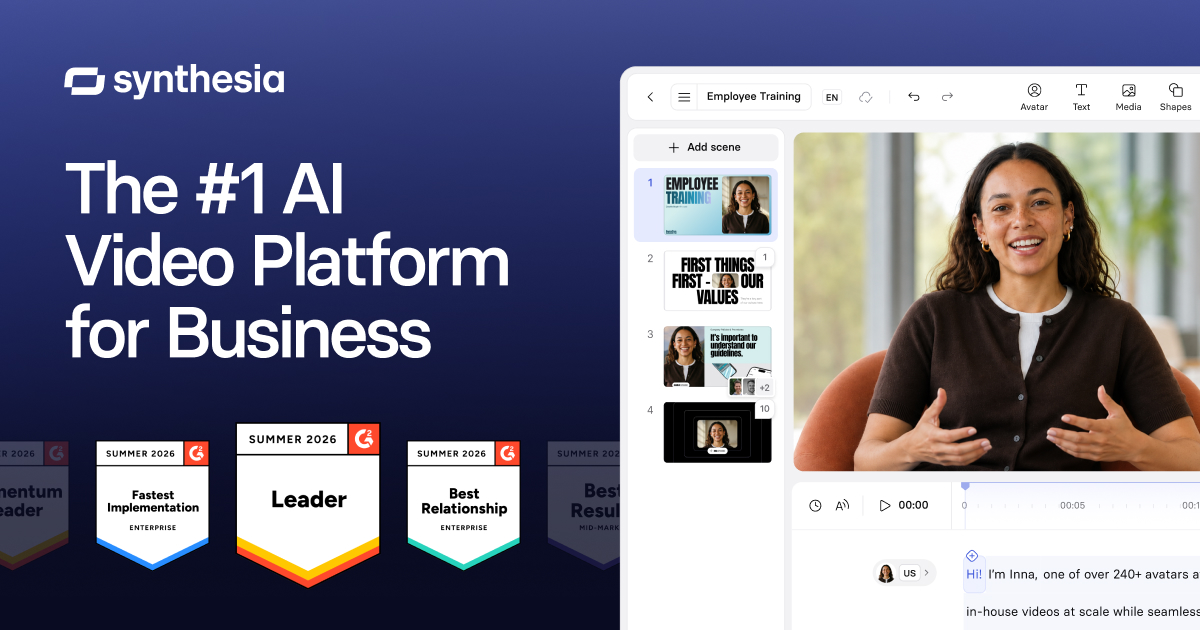
Synthesia is an AI video platform that turns scripts, documents and slides into presenter-led videos featuring AI avatars and synthetic voices. Instead of filming a person on camera, you choose an avatar (or create one of yourself), type the script and let the platform generate the video. Synthesia is widely used for corporate training, onboarding, product explainers and internal communications, and it supports dubbing and translation into other languages.
Key features
According to Synthesia's pricing page (October 2026):
- Stock AI avatars: 125+ on Starter and 180+ on Pro, with personal avatars (5 on Pro) created from your own footage.
- AI Video Assistant: helps turn ideas or documents into draft videos.
- Video and dubbing: credits can be spent on new videos or on dubbing existing ones.
- Interactive videos and branded video pages on Pro.
- Surveys: collect responses from viewers (3 responses on the free tier).
- Collaboration: guest seats (3 on Starter, 5 on Pro) and paid learner seats.
- Interactive avatars and roleplay training: real-time conversational avatars for practice scenarios such as sales conversations, with completion tracking and scoring for learners.
- Enterprise features: 240+ stock avatars, unlimited personal avatars, one-click translation into 140+ languages, SAML/SSO, Brand Kits, live collaboration and SCORM export for learning management systems.
- APIs for dubbing and interactive avatars, for teams building video into their own products.
Pricing (verified October 2026)
- Basic: free. 500 credits per month (about 10 minutes of video or dubbing). Videos carry a watermark.
- Starter: $29/month billed monthly. Adds 1,250 credits on top of the free allowance (about 12 minutes of extra video), video downloads, logo/watermark removal and the AI Video Assistant.
- Pro: from $89/month billed monthly for 6,000 credits (about 60 minutes). Higher credit tiers are available, up to $676/month for 48,000 credits.
- Enterprise: custom pricing.
Synthesia says yearly billing saves up to four months compared with paying monthly. Roleplay Training learner seats are listed at $29 per learner per month and can be added to any plan. The pricing calculator says video costs about 100 credits per minute and dubbing about 76 credits per minute, and that the first 10 minutes are included on every plan. Credits are the core unit, so the right plan depends on how many minutes you produce each month.
Estimating your plan
Begin with your expected monthly output. At roughly 100 credits per minute, a team making four 5-minute training videos a month (20 minutes) would fit within the free 10 minutes plus Starter's extra 12 minutes, while a weekly cadence of longer modules points towards Pro. Remember that edits and re-renders also use credits, so leave headroom.
Who it's for
- Learning and development teams producing training modules at scale.
- HR and internal-communications teams creating onboarding and policy videos.
- Product and customer-success teams making how-to and explainer videos.
- Organisations that need the same video in several languages.
Pros
- Produces presenter-style video without cameras, studios or actors.
- Easy to update: edit the script and regenerate instead of reshooting.
- Dubbing helps localise content.
- Usable free tier for testing.
- Transparent credit-to-minutes conversion on the pricing page.
Cons
- Free videos are watermarked and downloads require a paid plan.
- Avatar videos suit training and explainers more than emotional or cinematic storytelling.
- Costs rise quickly for high-volume production on Pro tiers.
- Creating avatars of real people requires care over consent and policy.
Alternatives on AIMAPER
- Runway: generative video for creative and cinematic footage.
- Descript: edit real recordings by editing text, with AI avatars and dubbing on higher plans.
- ElevenLabs: voice generation and dubbing if you only need audio.
See more options in our AI video tools category.
Bottom line
Synthesia is a strong fit when you need clear, consistent presenter videos at scale, especially for training and multilingual communication. Use the free tier to judge avatar quality for your audience, estimate your monthly minutes, and pick the credit tier that matches.
Details
- Pricing
- Paid · from $29/mo
- Billing
- monthly
- Release date
- 2026-05-12
- Last checked
- 10h ago
- Indexing
- index, follow
- Category
- Video
Suggest an edit
Sign in to suggest an edit.
Alternatives
 HeyGenHeyGen turns a script into a video with an AI presenter, including avatars built from your own footage and dubbed translations in 175+ languages.
 Colossyan CreatorPower users get deeper controls, while casual users can ignore them. The result is a tool that scales from quick one-off tasks to larger recurring workloads. It fits naturally into...
 Deepreel ComIt fits naturally into daily work. Whether you are handling a single quick task or a batch that would eat an afternoon, the tool keeps the pace steady. The tool...
 PictoryAI-powered video creation and editing tool for marketing and content creation.
 Runway MLRunway review (October 2026): AI video generation platform, Gen-4.5 and partner models, verified Free, Standard, Pro and Max pricing, pros and cons.
 VislaAI video creation and editing tool for businesses and teams.
 Luma AILuma AI is a creative workspace with AI agents and its own Ray3.2 video and Uni-1 image models, plus third-party models, on Plus, Pro and Ultra plans.
 Veed IoOnline video editor with AI tools for creating professional videos quickly and easily.
 VideoideasaiAI assistant for YouTube creators to generate video scripts and content ideas.
 AI Video CutAI tool to repurpose long videos into short, engaging clips for social media.
 Opus Clip AIAI-powered video repurposing tool for creating viral short clips from long videos.
 Krikey AIThe tool is free, which keeps the barrier to entry low. You can try it before deciding whether it earns a permanent place in your workflow. There is a deliberate...
Pricing
- Pricing model: Paid
- Starting price: $29/mo
- Billing: monthly
Pros and cons
Pros
- Produces presenter-style video without cameras, studios or actors.
- Easy to update: edit the script and regenerate instead of reshooting.
- Dubbing helps localise content.
- Usable free tier for testing.
- Transparent credit-to-minutes conversion on the pricing page.
Cons
- Free videos are watermarked and downloads require a paid plan.
- Avatar videos suit training and explainers more than emotional or cinematic storytelling.
- Costs rise quickly for high-volume production on Pro tiers.
- Creating avatars of real people requires care over consent and policy.