


Pebblely
Pebblely turns plain product photos into styled scenes with 100+ templates and custom prompts, on Lite, Basic and Pro monthly image plans.
Sign in to rate this tool.
Overview
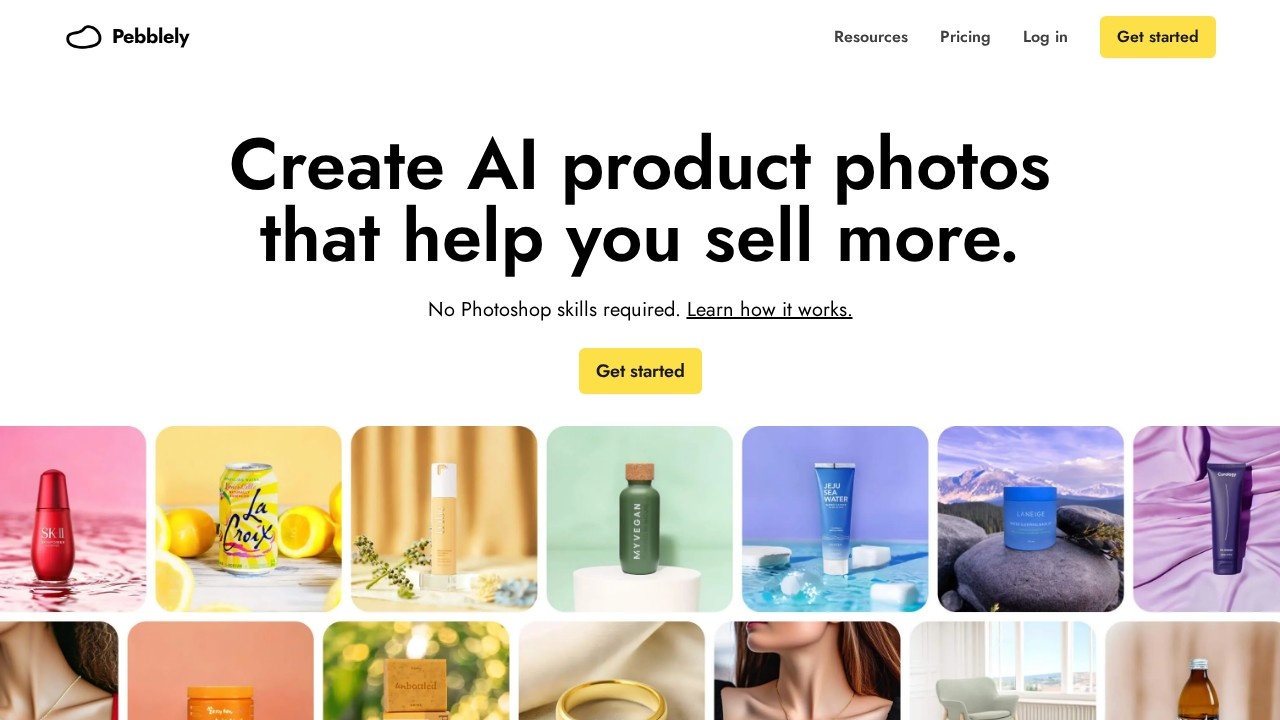
Pebblely does one job: it turns a plain photo of your product into a styled product shot. You upload the item and AI places it in a new scene, like standing on beige silk, floating in water, or on a wooden table in a sunny living room. You don't need Photoshop skills, which is the main selling point.
The same product photo can become many marketing assets: marketplace listing images, social posts, website imagery, email banners and ad creatives. Pebblely says more than 25 million images have been generated and over a million creatives use it.
Templates and prompts
More than 100 templates give you a starting point. They read like short scene descriptions ("Standing on a white riser, yellow background, studio product photography"), and there are templates for jewellery on a model, home interiors and outdoor settings. Paid plans include 40+ background themes and custom prompts, so you can describe a scene of your own. Higher plans add bulk generation, so you can create many product photos at once with similar or varied backgrounds, which helps when a catalogue grows.
Pricing
From the official pricing page, checked October 2026:
- Lite: US$9 a month for 30 images, 40+ themes and custom prompts.
- Basic: US$19 a month for 200 images, plus bulk generation.
- Pro: US$39 a month for 500 images.
The yearly plan gives you two or more months free. Subscriptions renew automatically and can be cancelled anytime in the app. The pricing FAQ covers free trials, discounts, business use of photos, training on your uploads, unused credits and refunds, so read it before you subscribe: pebblely.com/pricing.
Who it suits
Small online sellers on any marketplace, and social media managers who need attractive product images fast and don't have a studio.
Pros: very easy; good templates for common scenes; affordable entry plan.
Cons: image limits on lower plans; bulk generation needs Basic or above; fewer editing tools than broader platforms.
Alternatives
Claid adds fashion models and an API. Photoroom combines product scenes with a full editor, and PicWish is another option for cutouts and product images.
Details
- Pricing
- Paid
- Release date
- 2025-06-13
- Last checked
- 16h ago
- Indexing
- index, follow
- Category
- Photography
Suggest an edit
Sign in to suggest an edit.
Alternatives
 ClaidClaid is an AI product photography suite for scenes, fashion models, video and enhancement, with a strong API and Free, Essentials, Pro and Business plans.
 OptivizioAI photo generator for professional-quality visuals.
 AI Photo EditorIf ai image generation tasks take up too much of your day, AI Photo Editor is built to give you time back. It handles the heavy lifting while leaving you...
 PhotoroomPhotoroom is an AI product photo editor with background removal, AI scenes, fashion models, video ads, batch editing and an API, on Pro, Max and Ultra plans.
 Stable VideoAI video model transforming images/text into videos.
 AI Ease AI Photo EditorSmall operations appreciate the low setup cost, and larger teams value the consistency. Both end up spending less time on busywork and more on the actual result. It also plays...
 AI Christmas PhotoTransforms selfies into AI-generated Christmas photos quickly and affordably.
 LensaLensa by Prisma Labs is a mobile photo editor with one-tap trend effects, beauty tools, an AI eraser and enhancer, hair try-on and presets.
 AI Product ShotIt also plays nicely with the rest of your stack. Links and files move in and out easily, so the tool sits naturally beside the software you already rely on....
 MokkerCollaboration hooks are there too - simple ways to pass work between teammates without emailing files back and forth or losing track of versions. Mokker is a ai image generation...
 Chromatic LensIf ai business tasks take up too much of your day, Chromatic Lens is built to give you time back. It handles the heavy lifting while leaving you in control....
 Rush Roto Product Photo A IWhat stands out most is predictability. The same input produces dependable output, which matters when you are producing work for clients or publishing on a schedule. It runs on a...
Pros and cons
Pros
- very easy
- good templates for common scenes
- affordable entry plan
Cons
- image limits on lower plans
- bulk generation needs Basic or above
- fewer editing tools than broader platforms