


Image to Image
Image to Image is a web app that combines an uploaded photo with a text prompt to create a new version of that image, keeping useful visual context such as…
Sign in to rate this tool.
Overview
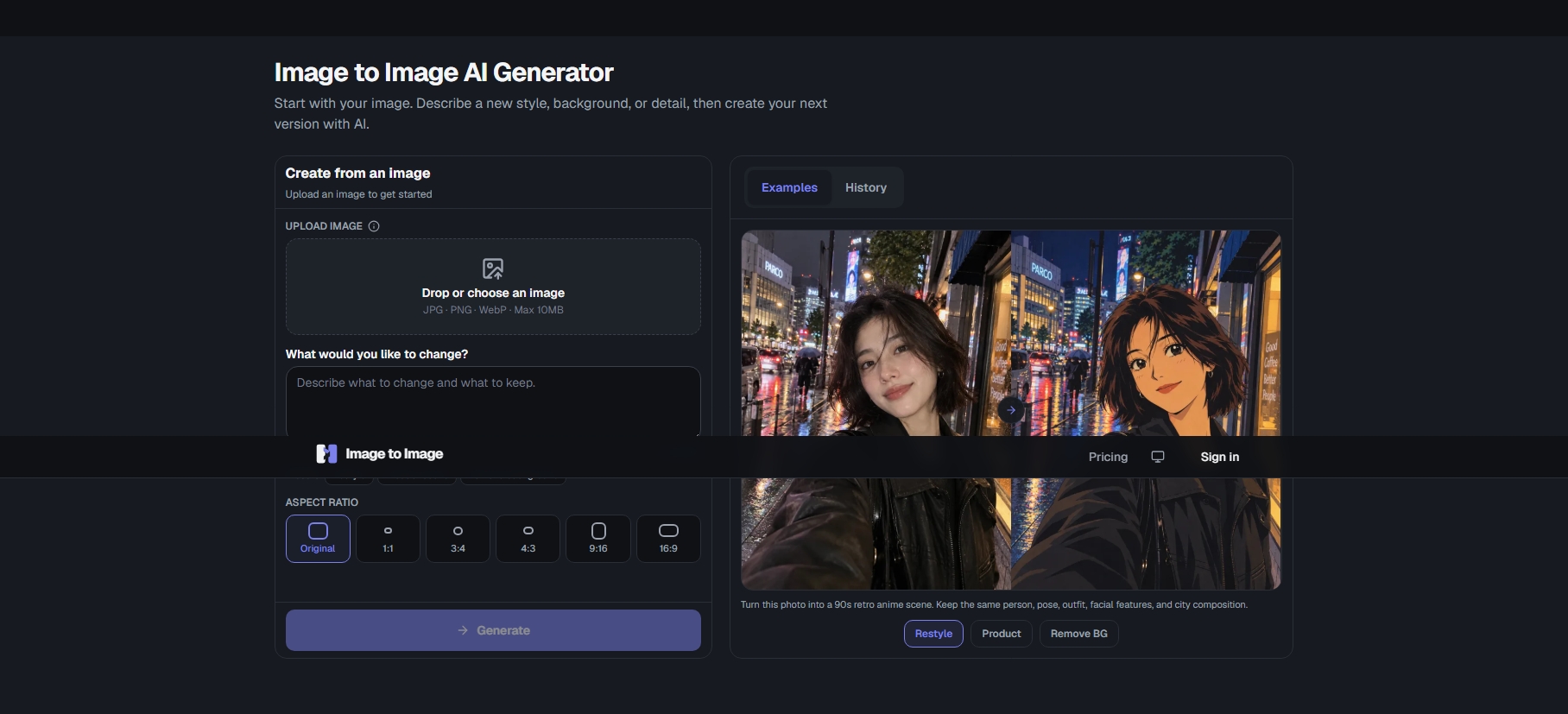
Image to Image (imagetoimage.org) is a web-based AI editor that starts from a photo you already have. You upload an image, describe in plain English what should change and what should stay the same, and the generator produces a new version. It is aimed at people who want to restyle a picture, stage a product or make a precise edit without learning layers, masks or an editing timeline.
How it works
The process has three steps: upload a JPG, PNG or WebP image up to 10 MB, write your instructions (up to 2,000 characters), then generate and download. You can choose an aspect ratio, from the original to 1:1, 3:4, 4:3, 9:16 or 16:9, and start from presets for restyling, product scenes or background removal. The source image and prompt stay visible next to each result so you can use the output as the starting point for the next round, and a history panel keeps earlier generations.
What it is good at
The examples on the site show three kinds of job:
- Restyling: turning one portrait into an editorial collage, pencil sketch, illustration, anime frame or oil painting.
- Product scenes: placing an unchanged product, such as a leather chair, in a new interior for e-commerce or lifestyle imagery.
- Precise edits: changing one detail, such as swapping a hat for a flower crown, while keeping face, pose, background and lighting the same.
Each example comes with the full prompt and an explanation of why it works. The pattern is to name what to change and give a clear list of what to preserve, which is useful advice for any image-editing model. The site also links to related tools, including a photo-to-coloring-page converter and a manual editor called PhotoCraft.
Pricing
Image to Image is paid, with credit packs and monthly or yearly plans. The one-time packs listed on the pricing page in October 2026 are:
- Starter Pack: $9.99 for 200 credits (up to 66 GPT Image 2 or 50 Nano Banana 2 generations).
- Creator Pack: $29.99 for 700 credits.
- Pro Pack: $59.99 for 1,600 credits.
Pack credits stay valid for 12 months, include commercial usage rights and generate at 1K resolution. Subscription prices, rollover rules and refunds are on imagetoimage.org/pricing.
Who it suits
Online sellers, social media users and anyone who wants quick, prompt-driven edits of an existing photo without opening a full design suite.
Pros: works from your own photo, not a blank prompt; helpful example prompts; credits last 12 months.
Cons: no free plan is listed; output is 1K resolution; results depend on how carefully you write the keep-list.
Details
- Pricing
- Paid
- Last checked
- 17h ago
- Indexing
- index, follow
- Category
- Image
Suggest an edit
Sign in to suggest an edit.
Alternatives
 ArtblastaiIt is a practical choice for ai image generation work, and the honest way to evaluate it is to give it a spin. Start at artblastai.com for the latest information....
 AI Photo EditorIf ai image generation tasks take up too much of your day, AI Photo Editor is built to give you time back. It handles the heavy lifting while leaving you...
 AI Profile Picture MakerThe feature set covers the basics well and adds thoughtful extras - keyboard shortcuts, reusable templates, and clean sharing options - without overwhelming you. Built for ai image generation work,...
 AI Cartoon GeneratorTeams running regular ai image generation campaigns turn to it for repeatable output, and solo creators use it to push through tasks that would otherwise stall their day. A few...
 PicWishPicWish is a simple AI photo editor for background removal, enhancement, AI design and product images, with free, Pro, Max and pay-as-you-go options.
 SharpniqThe flexibility shows when the same tool is used to sketch a quick idea in the morning and to polish final work in the afternoon. Sharpniq brings a fresh take...
 Chromatic LensIf ai business tasks take up too much of your day, Chromatic Lens is built to give you time back. It handles the heavy lifting while leaving you in control....
 DALL-E 3DALL·E in ChatGPT review (October 2026): DALL·E is retired; what ChatGPT Images now offers, plan access, pricing, pros, cons and alternatives.
 Free Outline Image GeneratorFreelancers use it to keep client work moving, while in-house teams rely on it for consistent output across projects. Either way, the routine parts of ai image generation work get...
 CraiyonCraiyon makes AI images from plain-language prompts with no account needed, and adds paid editing credits, private images and no watermarks.
 MokkerCollaboration hooks are there too - simple ways to pass work between teammates without emailing files back and forth or losing track of versions. Mokker is a ai image generation...
 AI ShotsFor anyone who lives in the ai image generation space, AI Shots is a refreshing find. The setup is light, the results are solid, and nothing is hidden behind menus....
Pros and cons
Pros
- works from your own photo, not a blank prompt
- helpful example prompts
- credits last 12 months
Cons
- no free plan is listed
- output is 1K resolution
- results depend on how carefully you write the keep-list
Checked 2026-10-22.