


Patchwork Tattoos
Patchwork Tattoos is an AI tattoo and image generation tool for exploring patchwork tattoo ideas, sleeve inspiration, filler concepts, and design variations. Users can generate or remix visual tattoo concepts…
Sign in to rate this tool.
Overview
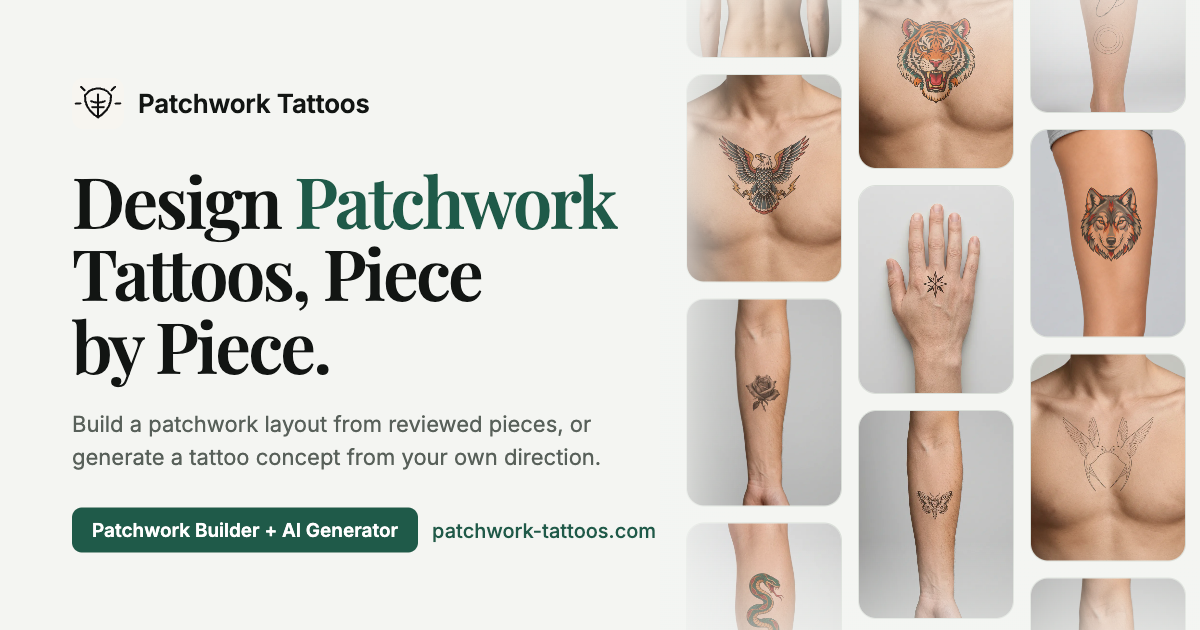
Patchwork Tattoos is a tattoo design site that combines a library of reviewed patchwork-style designs with an AI tattoo generator. Patchwork tattoos are collections of separate small pieces placed close together, and the site lets you either build a layout from existing pieces or generate a new concept from your own description. Each design is shown as a clean drawing next to the same design previewed on skin.
AI tattoo generator
You describe the idea, for example "small moth with moon phases", or start from your own photo or sketch, then guide it with optional controls:
- Placement: dozens of spots from forearm, wrist and finger to collarbone, spine, calf and behind the ear.
- Style: including black and grey realism, blackwork, color realism, dotwork, engraving, fine line, geometric, micro realism, minimalist, neo traditional and old school.
- Subject: a long list of flowers, animals, celestial symbols, objects, mythology and ornaments, from peony and koi to Medusa and mandala.
- Use case and vibe: filler ideas, first tattoo, matching, pet portrait, sleeve; bold, dark, feminine, minimal or symbolic.
You can get one concept, or four directions of the same idea when signed in. The site is honest about limits: it works less well for exact words, names and dates (use the Tattoo fonts tool), a recognisable likeness of a real person, a full sleeve as one connected piece, and tiny details that would blur on skin.
Other tools and the library
Alongside the generator there are tools for photo to tattoo, tattoo fonts, a Patchwork Builder for arranging pieces, a stencil maker and cover-up ideas. The reviewed library lets you filter by style, placement and subject, add a piece to the Builder or download the design free as a PNG without signing up.
Pricing
Two free concepts with no sign-up. A concept costs 20 credits otherwise. From the pricing page, checked October 2026, annual plans (billed yearly) are:
- Starter: $8/month, 300 credits a month (about 15 concepts).
- Pro: $16/month, 900 credits a month (about 45 concepts).
- Studio: $39/month, 3,000 credits a month (about 150 concepts).
Monthly billing costs about 20% more, and one-time credit packs that never expire are also sold. Paid tiers unlock 4K files and Builder exports.
Who it suits
People planning a first tattoo or a patchwork sleeve who want to explore ideas and placements before visiting an artist, and artists looking for quick reference concepts to discuss with clients.
Pros: detailed style and placement controls; on-skin previews; free downloadable library designs.
Cons: weak at lettering and portraits; monthly credits expire at each refresh; a concept is a starting point to take to a tattoo artist, not a final stencil.
Details
- Pricing
- Freemium
- Last checked
- 12h ago
- Indexing
- index, follow
- Category
- Image
Suggest an edit
Sign in to suggest an edit.
Alternatives
 Rescape AIIt works well as a daily driver. Saved templates, recent history, and multiple output options mean the tool adapts to the way you actually work. If ai image generation tasks...
 Scribble To ArtIt is a practical choice for ai image generation work, and the honest way to evaluate it is to give it a spin. Start at scribbletoart.com for the latest information....
 MidjourneyMidjourney review (October 2026): AI image and video generator features, verified Basic to Mega pricing, licensing, pros, cons and alternatives.
 Mood Board AIMood Board AI is a focused ai image generation solution that answers a clear need. You can see what it does within minutes of opening the page. Before you decide,...
 Tensor.ArtTensor.Art is a free online image generator and model hosting site where you run community checkpoints and LoRAs or use guided tools like OC Creator.
 OksuroYou will find a free plan, making it easy to test the tool against your own needs first. The practical way to judge it is to use it. What stands...
 ArtblastaiIt is a practical choice for ai image generation work, and the honest way to evaluate it is to give it a spin. Start at artblastai.com for the latest information....
 Bulk Image GenerationPlenty of detail is tucked into the options area: adjustable quality levels, formatting choices, and automation that removes the repetitive part of ai image generation work. Freelancers use it to...
 FotorFotor is an online photo editor and design tool with dozens of one-click AI tools for enhancing, removing, styling, generating images and video.
 Packify AIFor anyone who lives in the ai image generation space, Packify AI is a refreshing find. The setup is light, the results are solid, and nothing is hidden behind menus....
 Chromatic LensIf ai business tasks take up too much of your day, Chromatic Lens is built to give you time back. It handles the heavy lifting while leaving you in control....
 Popai ProIt also plays nicely with the rest of your stack. Links and files move in and out easily, so the tool sits naturally beside the software you already rely on....
Pros and cons
Pros
- detailed style and placement controls
- on-skin previews
- free downloadable library designs
Cons
- weak at lettering and portraits
- monthly credits expire at each refresh
- a concept is a starting point to take to a tattoo artist, not a final stencil
Checked 2026-10-22.