


Passport Maker
Power users get deeper controls, while casual users can ignore them. The result is a tool that scales from quick one-off tasks to larger recurring workloads. Passport Maker is a...
Sign in to rate this tool.
Overview
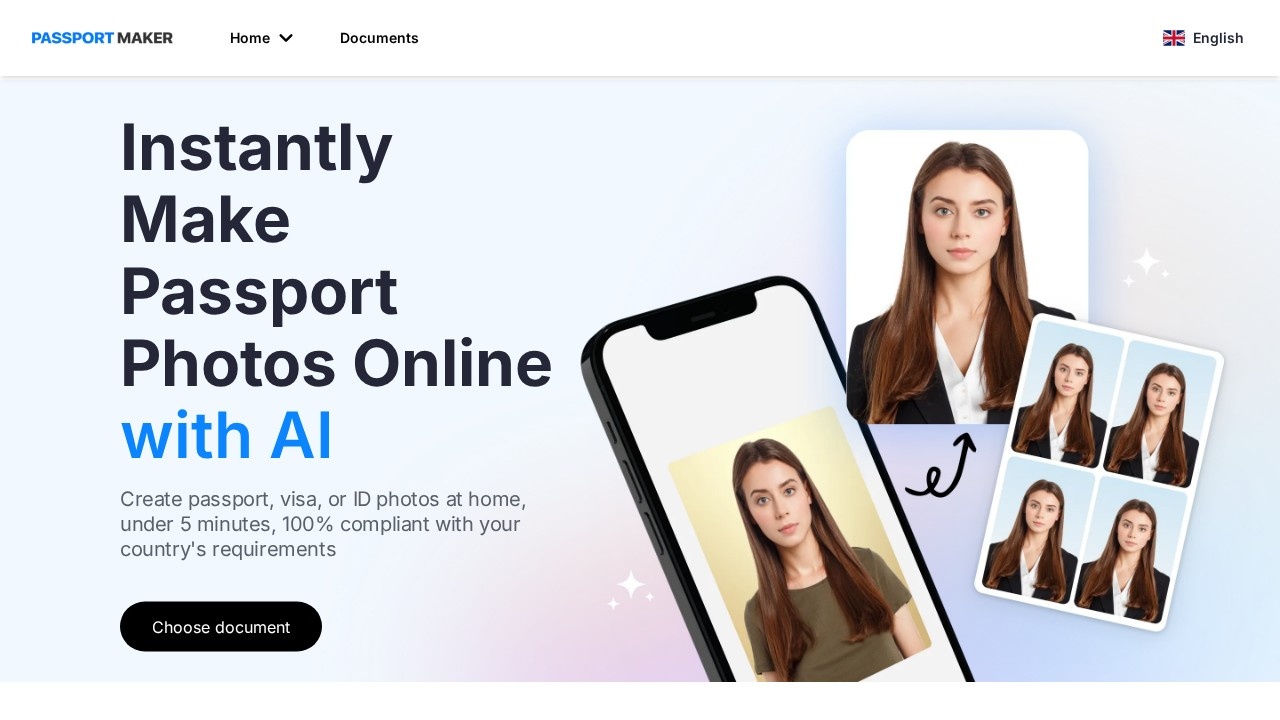
Passport Maker is an online tool that creates passport, visa and ID photos from a picture taken at home. You choose the document, upload a photo, and its AI crops, resizes and adjusts the picture to match that document's official requirements. The site says the process takes under five minutes and aims for full compliance with each country's rules.
How it works
There are three steps. First, choose the document, such as a US passport, a UK visa or an Indonesian driving licence, and upload your image. Second, the AI formats the photo to the correct size and dimensions, and you can make manual edits, including changing the background colour or adding a suit or shirt. Third, review the result and download it.
The document list covers many countries and types, from passports and visas to driving licences and national ID cards, so the same tool works for several applications.
Shooting tips
The site includes a guide with good and bad examples for background, head position, accessories, shadows and lighting, and posing. It recommends a clean, plain white or off-white wall, without patterns, shadows or objects behind you. Following these tips matters, because AI editing cannot fully fix a blurry or badly lit photo.
Who it is for
It suits people renewing a passport or applying for a visa who want to avoid a photo booth or studio, families preparing photos for several members, and anyone who has had a photo rejected for size or background problems.
Pricing
The site does not show prices on its main page, so check the current cost for your document before you start. Look for whether the price includes several attempts or edits.
Things to consider
Rules differ by country, and some do not accept digitally edited photos. Adding clothing or heavily altering the image may break rules that ban changes to your appearance, so read the official requirements first. Some applications need printed photos on specific paper, and others accept digital uploads only through their own system. Children and babies have extra rules. Keep the original photo, and check the official government website before submitting, since final acceptance is always up to the issuing authority.
Details
- Pricing
- Paid
- Release date
- 2025-12-20
- Last checked
- 4d ago
- Indexing
- index, follow
- Category
- Image
Suggest an edit
Sign in to suggest an edit.
Alternatives
 FotorFotor is an online photo editor and design tool with dozens of one-click AI tools for enhancing, removing, styling, generating images and video.
 AI Ease AI Photo EditorSmall operations appreciate the low setup cost, and larger teams value the consistency. Both end up spending less time on busywork and more on the actual result. It also plays...
 Smart Keys For IosPower users get deeper controls, while casual users can ignore them. The result is a tool that scales from quick one-off tasks to larger recurring workloads. Smart Keys For Ios...
 Gleap IoPower users get deeper controls, while casual users can ignore them. The result is a tool that scales from quick one-off tasks to larger recurring workloads. It is a practical...
 Visor AIPower users get deeper controls, while casual users can ignore them. The result is a tool that scales from quick one-off tasks to larger recurring workloads. The tool is free,...
 AI Photo EditorIf ai image generation tasks take up too much of your day, AI Photo Editor is built to give you time back. It handles the heavy lifting while leaving you...
 Resleeve AITeams running regular ai image generation campaigns turn to it for repeatable output, and solo creators use it to push through tasks that would otherwise stall their day. The tool...
 Raphael AIA description of this product, its capabilities, and its intended...
 DALL-E 3DALL·E in ChatGPT review (October 2026): DALL·E is retired; what ChatGPT Images now offers, plan access, pricing, pros, cons and alternatives.
 Fluxai Art Free AI Image GeneratorRather than chasing every possible feature, Fluxai Art Free AI Image Generator picks the ones that matter and does them well. That restraint is noticeable the first time you open...
 ArtblastaiIt is a practical choice for ai image generation work, and the honest way to evaluate it is to give it a spin. Start at artblastai.com for the latest information....
 Free Outline Image GeneratorFreelancers use it to keep client work moving, while in-house teams rely on it for consistent output across projects. Either way, the routine parts of ai image generation work get...